
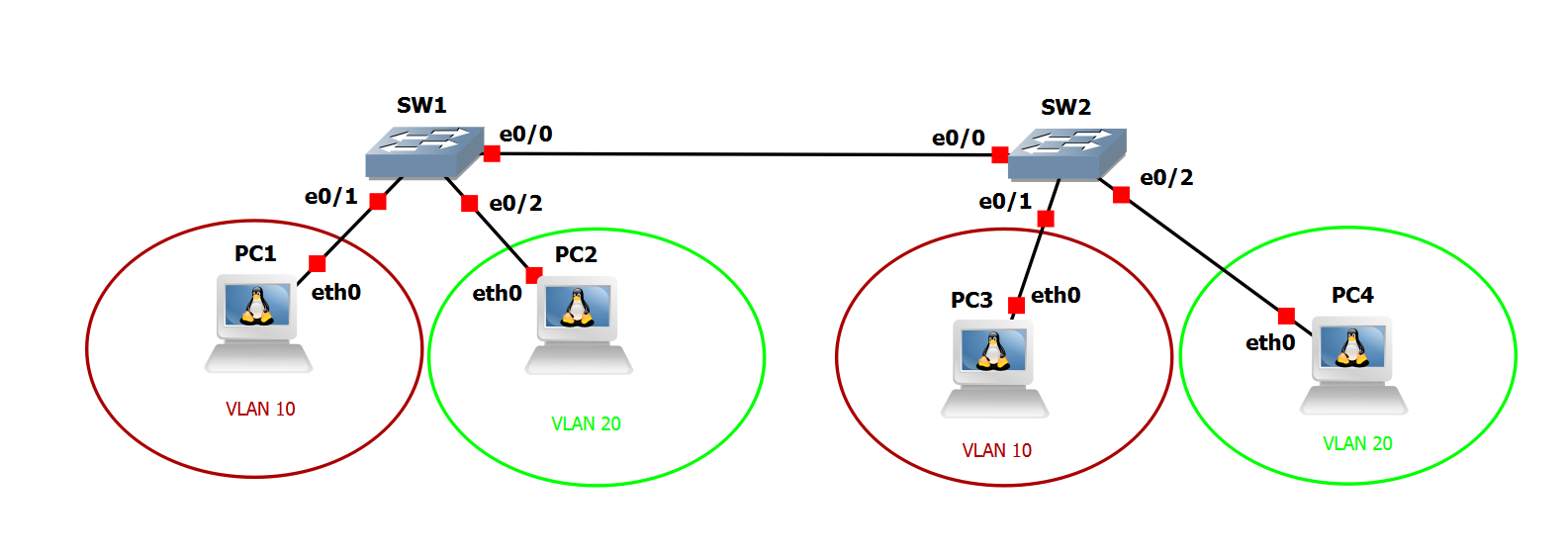
To configure an ip address: ifconfig eth0 <ip address> netmask <mask> up
To confirm the ip address on the interface: ifconfig
To configure the gateway ip address: route add default gw <gateway ip address>
To confirm the default gateway ip: route
To enable DHCP for an interface: udchpc <interface>
ctrl+c or command+c on MAC to cancel a ping or traceroute command
If a username and password is requested to login into the linux PC host within the topology, use: gns3/gns3 or tc/tc
Create VLAN 10 and name the vlan DATA
Create VLAN 20 and name the vlan Management
- Verify the vlans were created
Configure the port going to PC1 as an access port and assign it to VLAN 10
Configure the port going to PC2 as an access port and assign it to VLAN 20
- Verify that the port going to PC1 is in VLAN 10 as well as an access-ports
- Verify that the port going to PC2 is in VLAN 20 as well as an access-ports
Create in SVI interface for VLAN 10 and set the ip address to 192.168.10.1/24 and make sure the port is in the UP/UP state
Create in SVI interface for VLAN 20 and set the ip address to 192.168.20.1/24 and make sure the port is in the UP/UP state
Create a static trunk to SW2 using dot1q
Create VLAN 10 and name the vlan DATA
Create VLAN 20 and name the vlan Management
- Verify the vlans were created
Configure the port going to PC3 as an access port and assign it to VLAN 10
Configure the port going to PC4 as an access port and assign it to VLAN 20
- Verify that the port going to PC3 is in VLAN 10 as well as an access-ports
- Verify that the port going to PC4 is in VLAN 20 as well as an access-ports
Create in SVI interface for VLAN 10 and set the ip address to 192.168.10.2/24 and make sure the port is in the UP/UP state
Create in SVI interface for VLAN 20 and set the ip address to 192.168.20.2/24 and make sure the port is in the UP/UP state
Create a static trunk to SW1 using dot1q
Configure PC1 with ip address 192.168.10.11/24, and its gateway for 192.168.10.1
Configure PC2 with ip address 192.168.20.11/24, and its gateway for 192.168.20.1
Configure PC3 with ip address 192.168.10.12/24, and its gateway for 192.168.10.1
Configure PC4 with ip address 192.168.20.12/24, and its gateway for 192.168.20.1
Test connectivity between PC1, PC2, PC3, PC4, and SW1 and SW2's SVI interfaces for vlan 10 and vlan 20 (All device in the topology should be able to ping each other)
configure terminal
vlan 10
name DATA
vlan 20
name Management
exit
interface e0/0
switchport trunk encapsulation dot1q
switchport mode trunk
no shutdown
exit
interface e0/1
switchport mode access
switchport access vlan 10
exit
interface e0/2
switchport mode access
switchport access vlan 20
exit
interface vlan 10
ip address 192.168.10.1 255.255.255.0
no shutdown
exit
interface vlan 20
ip address 192.168.20.1 255.255.255.0
no shutdown
exit
end
show vlan
show vlan brief
show interface status
show interface switchport
show interface trunk
show run
show run int e0/0
show run int eth0/1
show run int eth0/2
show ip int br
show int vlan 10
show int vlan 20
show run int vlan 10
show run int vlan 20
configure terminal
vlan 10
name DATA
vlan 20
name Management
exit
interface e0/0
switchport trunk encapsulation dot1q
switchport mode trunk
no shutdown
exit
interface e0/1
switchport mode access
switchport access vlan 10
exit
interface e0/2
switchport mode access
switchport access vlan 20
exit
interface vlan 10
ip address 192.168.10.2 255.255.255.0
no shutdown
exit
interface vlan 20
ip address 192.168.20.2 255.255.255.0
no shutdown
exit
end
show vlan
show vlan brief
show interface status
show interface switchport
show interface trunk
show run
show run int e0/0
show run int eth0/1
show run int eth0/2
show ip int br
show int vlan 10
show int vlan 20
show run int vlan 10
show run int vlan 20
ifconfig eth0 192.168.10.11 netmask 255.255.255.0 up
ifconfig
ifconfig eth0 192.168.20.11 netmask 255.255.255.0 up
ifconfig
ifconfig eth0 192.168.10.12 netmask 255.255.255.0 up
ifconfig
ifconfig eth0 192.168.20.12 netmask 255.255.255.0 up
ifconfig